

Materials were four percent of the cost
Here is a machined part, fully costed. It uses a length of 4140 round bar, some welding rod and part of a cutting disc, and it passes through five machines and a pair of hands.
| Materials | 116.50 |
| Machine and labor time | 2,757.50 |
| Total cost per unit | 2,874.00 |
The short version. A machine hour rate is what one hour on a machine costs your business before anything is cut.
machine hour rate = annual cost of owning and running the machine
                    ------------------------------------------------
                    hours the machine actually runs in a year
Two rules decide whether the number is any good. Divide by running hours, not the hours you are open, or the rate comes out roughly 30 percent light. And count an operator once, either inside the machine rate or as a separate labor line, never in both. The rest of this article is those two rules in detail, then the setup that applies them to every part automatically.
The steel and consumables account for four percent of what that part costs to make. Everything else is time: seven hours and twenty minutes of it, spread across a CNC machine, a lathe, a mill, a band saw, a welding station, and an operator.
Quote that part on materials plus a markup, the way most workshops start out, and you will lose money on every single one. Not a little money. You would be pricing a 2,874.00 part somewhere near 150.00.
Nobody actually quotes that badly, of course. What happens in practice is more subtle and more damaging: the shop knows time matters, so it adds "a few hours at our shop rate" from memory. One rate for everything. The CNC and the band saw cost the same. A part that hogs the expensive machine subsidises a part that only needs the saw, the mix shifts over a year, and margin drifts without anyone being able to point at the cause.
The fix is not complicated. It is one rate per machine, one number for how long each part sits on each machine, and a system that multiplies them for you every time.
This guide covers both halves: how to work out a defensible hourly rate, and how to set it up so every part and every production order carries it automatically.
(Figures below are in whatever currency your account uses. The method does not change.)
Part one: what an hour on a machine actually costs
A machine hour rate answers a specific question. If this machine runs for one hour and cuts nothing at all, what did that hour cost the business?
Add up a year of the costs that exist because you own the machine.
| Annual cost | Amount |
|---|---|
| Depreciation (purchase 420,000 over 7 years) | 60,000 |
| Finance and insurance | 12,000 |
| Power, metered over the year | 40,000 |
| Service contract and repairs | 45,000 |
| Tooling and consumables not charged to jobs | 67,000 |
| Floor space, light, heat | 28,000 |
| Total | 252,000 |
Then divide by hours. This is the step that decides whether your rate is right or quietly useless.
Divide by running hours, not open hours
Your doors are open roughly 2,000 hours a year. The machine is not cutting for 2,000 hours. It is idle during setup, during breaks, while it waits for the previous operation, while a fixture is changed, while someone goes to find material, and during the weeks when that particular machine has nothing booked.
Say it genuinely runs 1,400 hours.
252,000 / 1,400 running hours   = 180.00 per hour
252,000 / 2,000 open hours      = 126.00 per hour
The second number is 30 percent lower, and it is wrong. Use it and every quote you produce is 30 percent short on that machine, forever, in a way that never shows up as a line item you can find. It shows up as a year that felt busy and finished flat.
If you do not know your running hours, estimate honestly and low. It is far safer to over-recover slightly than to build a year of quotes on a rate you cannot hit.
Do the same for labor
Labor has exactly the same trap. An operator paid 144,000 with 36,000 of payroll taxes and contributions costs 180,000 a year. Divide by the 2,080 hours in a working year and you get 86.54. But nobody is on a job for 2,080 hours. Take out leave, public holidays, training, cleaning, meetings and the genuinely unproductive gaps and you might have 1,500.
180,000 / 1,500 productive hours = 120.00 per hour
That is the number to put in. The 86.54 version understates every job by a quarter.
Count the operator once
This is the one modelling decision worth getting right before you start typing.
If a machine always has someone standing at it, you can either fold the operator into the machine rate, so 180.00 becomes 300.00, or keep the machine rate machine-only and add labor as a separate step with its own rate.
Keep them separate if you can. One operator often tends two or three machines, wage costs and machine costs move for different reasons, and separating them tells you which of the two is actually driving a part's cost.
What you must not do is both. Folding the operator into the machine rate and then also adding a labor step double counts the same person for the same hour, and the error is invisible because both numbers look reasonable on their own.
Do this exercise for every machine before you touch any software. Ten minutes per machine with last year's figures in front of you produces a set of rates you can defend to a customer, and the rest of this article is just typing them in once.
Part two: setting it up
Now the mechanics. This takes about twenty minutes for a shop with half a dozen machines, and you do it once.
Turn on three features
Settings, then Features. You need all three.
| Feature | Why |
|---|---|
| Bill of Materials | The list of what goes into the part. Other screens call this the recipe. |
| Work Orders | Production runs. Requires Bill of Materials. |
| Cost tracking | Adds Machines & labour under Manufacturing, which is where hourly rates live. |
If you cannot find the Machines and labour screen, Cost tracking is almost certainly off. That is the single most common reason people get stuck here, and it is easy to miss because Cost tracking is filed under Pricing rather than Manufacturing. Search the features list for "cost" rather than scrolling the manufacturing group.
Enter the machines and the labor
Manufacturing, then Machines & labour, then Add machine or operator. One row per machine, and one row per labor category.
Rates can be entered per hour or per minute, whichever way you think about that machine. A band saw you think of at 3.00 a minute goes in as 3.00 a minute and is stored as 180.00 an hour. Same money, one unit, no arguments later about which a number meant.
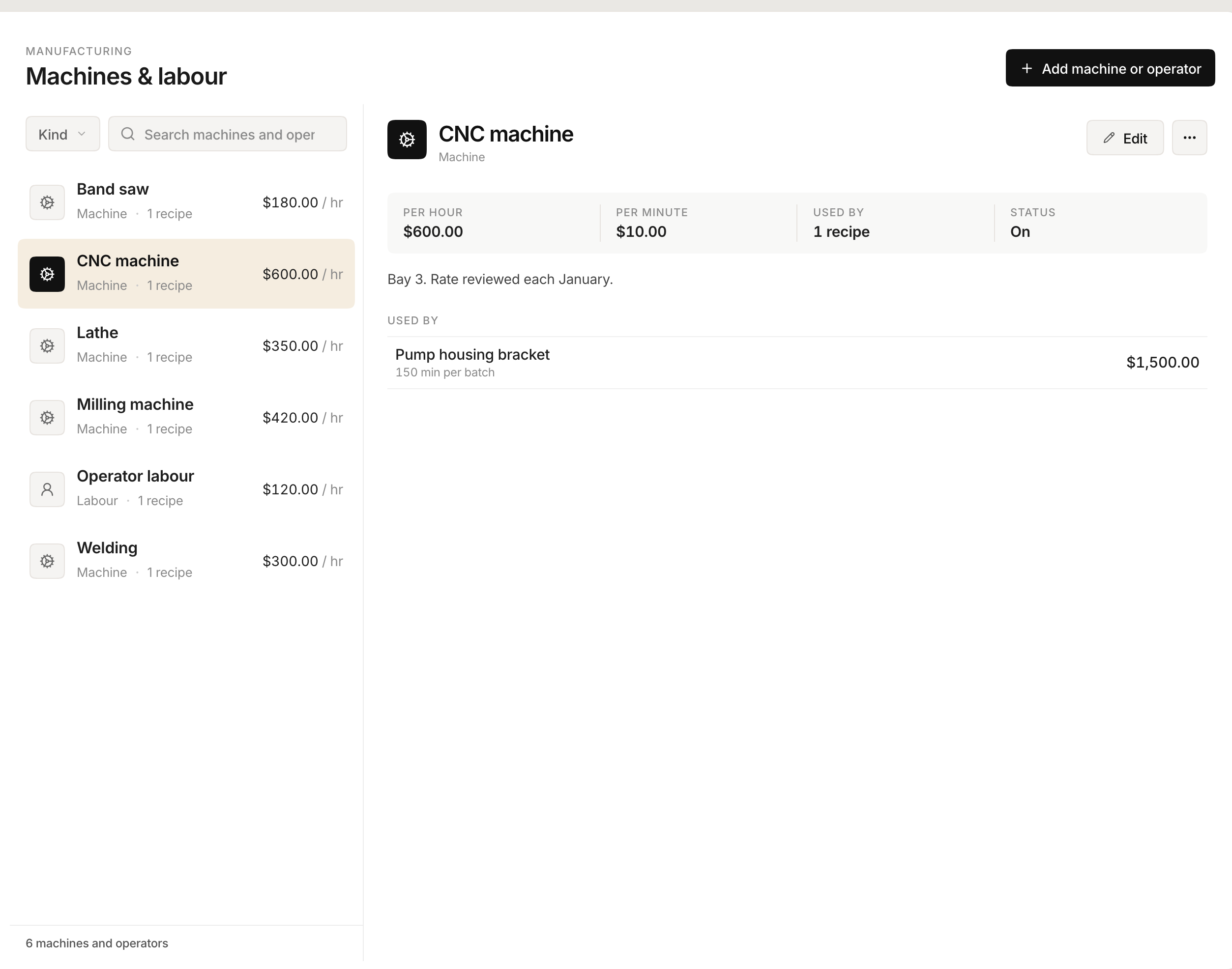
For the part costed at the top of this article:
| Name | Kind | Rate |
|---|---|---|
| CNC machine | Machine | 600.00 / hr |
| Lathe | Machine | 350.00 / hr |
| Milling machine | Machine | 420.00 / hr |
| Band saw | Machine | 180.00 / hr |
| Welding | Machine | 300.00 / hr |
| Operator labor | Labour | 120.00 / hr |
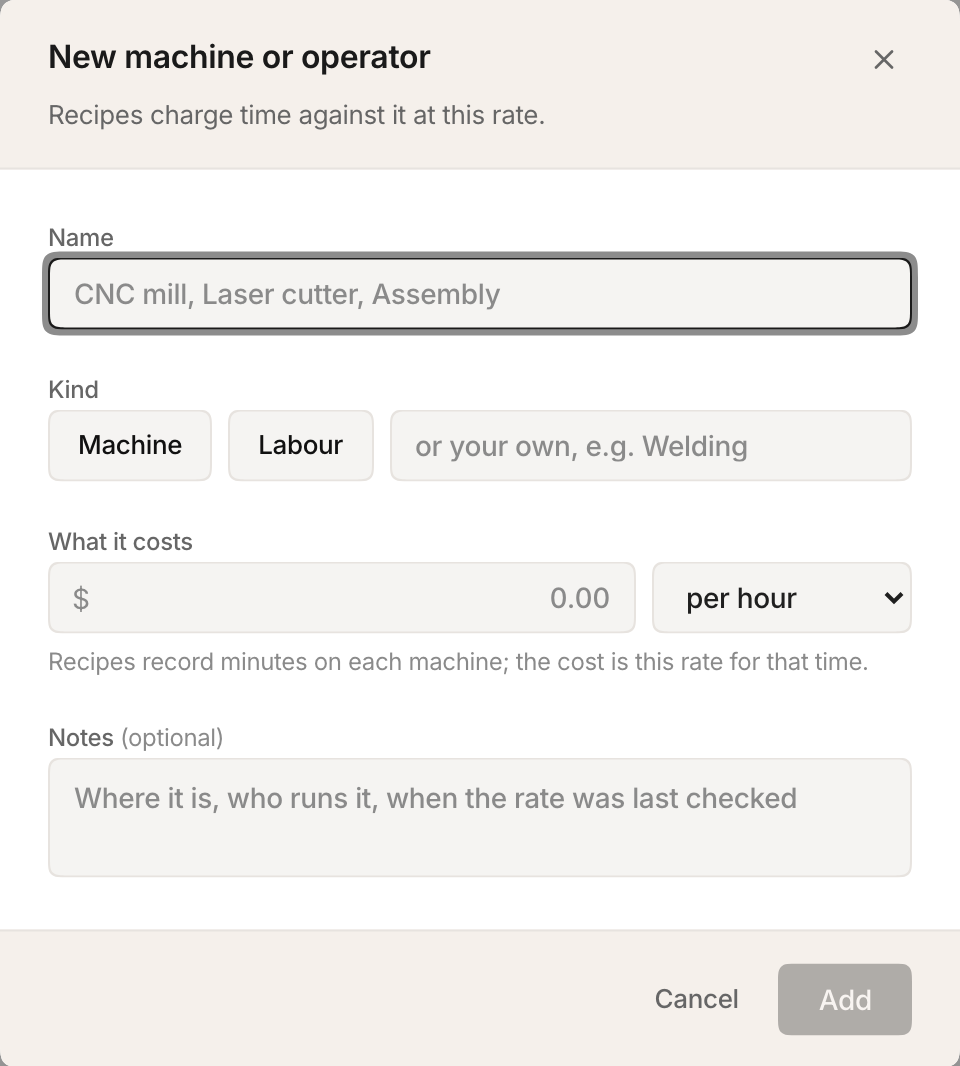
Three things this screen does that matter later.
The rate lives here and nowhere else. Put the mill up from 420 to 480 and every product that runs on it is repriced. You do not go looking for the recipes that mention it.
Each row tells you how much depends on it. A row says how many products charge time to that machine, so you can see at a glance what a rate change will move.
Nothing disappears by accident. A machine still used by a recipe cannot be deleted, and Stockria names the products that use it rather than just refusing. If a machine is retired, switch it off instead: it keeps its rate on the products already using it, stops being offered on new ones, and is marked Off in the list.
List the materials
Open the product, then the BOM tab, then Add component.
This is the steel, and it is also everything that gets consumed making one unit:
| Component | Quantity | Cost | Line |
|---|---|---|---|
| 4140 round bar | 2.5 kg | 38.00 / kg | 95.00 |
| Welding rod | 0.4 kg | 30.00 / kg | 12.00 |
| Cutting disc | 0.5 | 19.00 each | 9.50 |
| Materials | 116.50 |
Consumables need no special setup. If it is used up making the part, it is a component with a cost. Half a cutting disc is a perfectly good line.
If you are still working out material cost per finished unit and have not set this up anywhere yet, the free recipe cost calculator does that half on its own, with nothing to install.
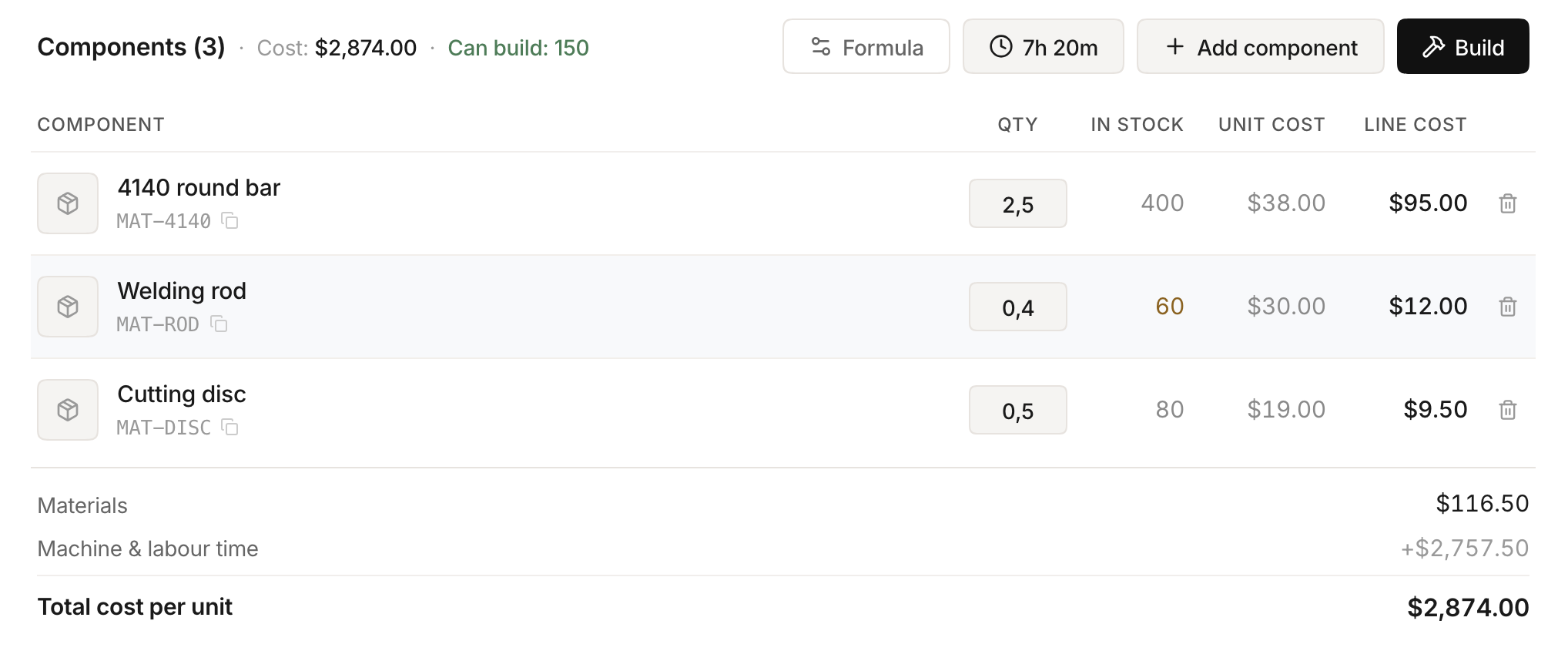
Add the time
Same BOM tab. Between Formula and Add component there is a button with a clock on it, labelled Time. Open it, then Add step: pick the machine, say how long.
| Step | Machine | Time | Rate | Cost |
|---|---|---|---|---|
| 1 | CNC machine | 2h 30m | 600.00 | 1,500.00 |
| 2 | Lathe | 45m | 350.00 | 262.50 |
| 3 | Milling machine | 1h 20m | 420.00 | 560.00 |
| 4 | Band saw | 15m | 180.00 | 45.00 |
| 5 | Welding | 30m | 300.00 | 150.00 |
| 6 | Operator labor | 2h | 120.00 | 240.00 |
| 7h 20m | 2,757.50 |
The time box is forgiving about format. All of these work:
2h 30m 2h30 2:30 2.5h 45m 150
A plain number means minutes. Before you press Add, the form tells you what it understood and what the step will cost, in the form Reads as 2h 30m, costing 1,500.00, so a typo in the time shows up as a wrong number before it is saved rather than three months later in a margin report. Add stays unavailable until a machine is chosen and a length is entered.
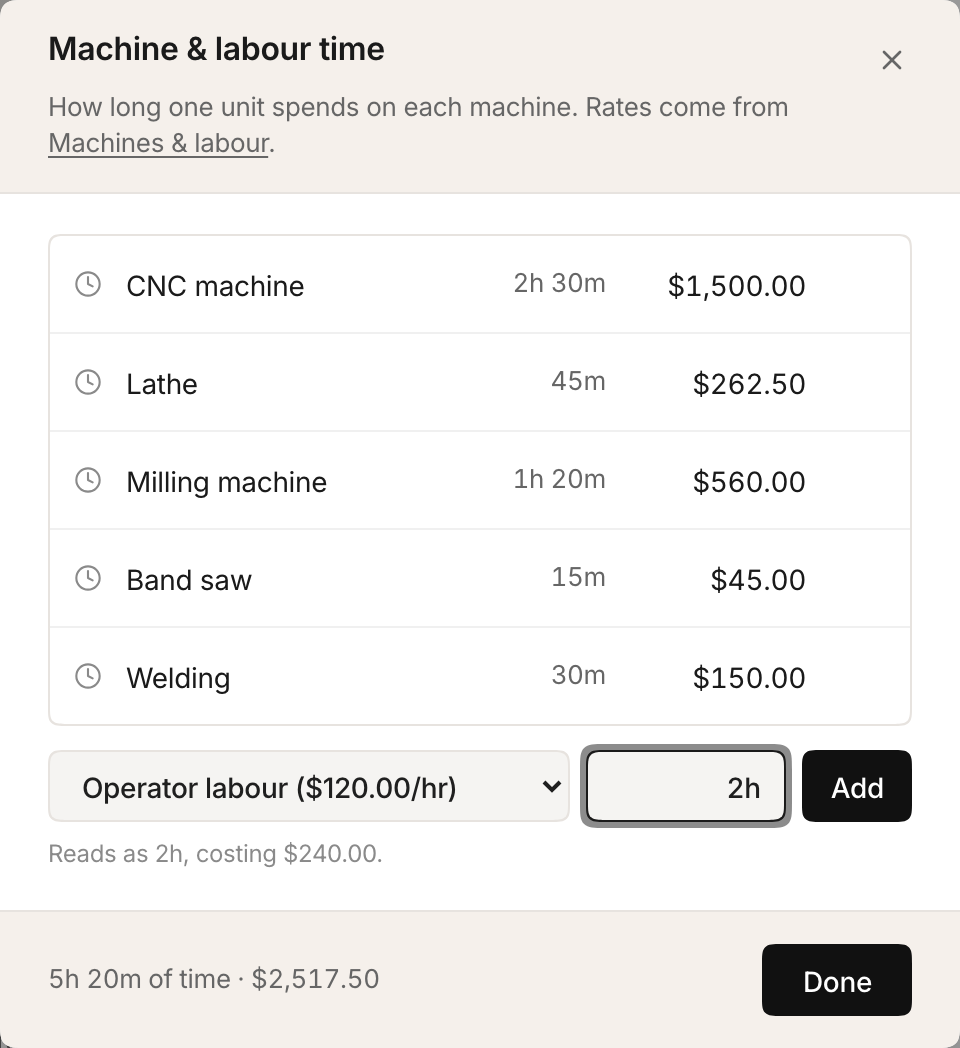
Six steps in, the panel totals the time and the money it represents.
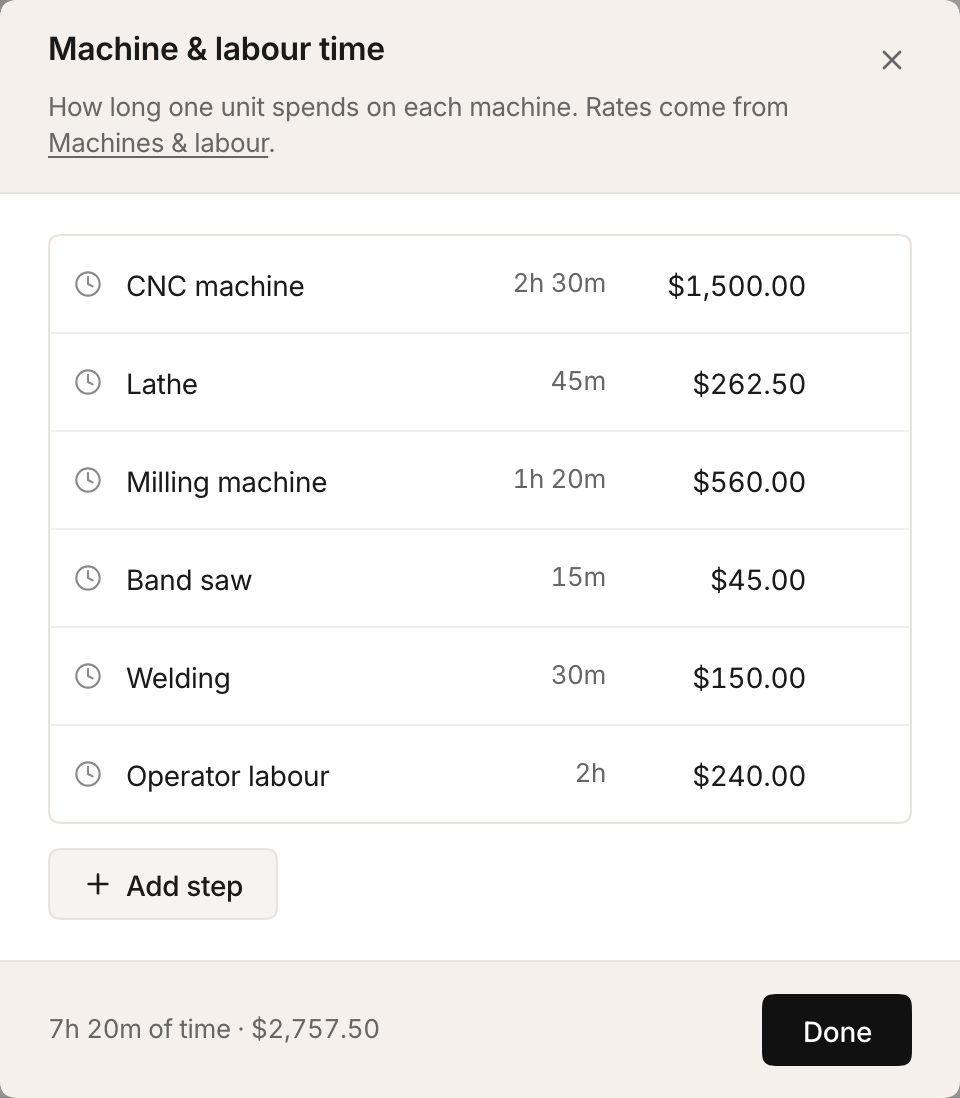
Close with Done. The toolbar button now reads 7h 20m instead of "Time", so the part's total machine time is visible without opening anything.
Read the cost
Underneath the components on the same tab:
Materials                       116.50
Machine & labour time         2,757.50
Total cost per unit           2,874.00
The Cost per item at the top of the product screen shows the same figure, which means every screen that uses product cost, including margin on a sales order and inventory valuation, is now working from a number that includes the seven hours.

Part three: running the job
Manufacturing, then Work Orders, then New work order. Choose the product and the quantity.
When the batch completes, its cost card keeps the two halves apart:
Materials
Machine & labour time
Total
Unit cost ... recorded to Cost History
Two details worth knowing about how those numbers are fixed.
Materials come off stock at what they actually cost that day, not at a list price. If the bar stock you bought last month was cheaper than the bar stock you bought today, the batch reflects what it consumed.
Machine time is priced at the rates in force when the batch ran, and stored on the order. Raise the CNC rate next quarter and your product cost updates immediately, but the batch you finished in March still says what it said in March. That is deliberate. If a rate change rewrote finished jobs, you could never compare two batches of the same part and learn anything, because the past would keep moving.
What goes into a manufactured cost
Five things, applied in this order:
- Components from the bill of materials, each at its own cost. Raw material and consumables alike.
- Machine and labor time from the steps, each at its machine's rate.
- Waste or scrap, a percentage of materials, set under Formula.
- A flat labor charge per batch, also under Formula.
- Overhead, a percentage applied to everything above, under Formula.
A note on number four. The flat labor charge predates the time-based method and still exists for shops that want one lump per batch rather than a rate per operation. Use one or the other. Setting both is the same double-count as folding an operator into a machine rate and then adding an operator step.
Three things that catch people out
Times are per batch, not per unit. If the bill of materials is written for a batch yield of four, both the component quantities and the step times describe one batch of four. A run of eight is two batches of time, not eight. Check the batch yield before you conclude the machine times look enormous.
A machine in use cannot be deleted. Stockria will tell you which products charge time to it. Switch it off instead, which keeps the rate on existing products and hides it from new recipes.
Removing a rate does not silently zero a cost. If a step's machine has gone, the step reads "no rate" rather than quietly costing nothing. A visible gap is recoverable. A step that silently costs zero is a wrong quote you never notice.
Revisit the rates once a year
A rate is a snapshot of a year that has already happened. Power prices move, the service contract renews, the machine finishes depreciating, and the hours you actually ran turn out to be different from the hours you assumed.
Put an hour in the calendar once a year. Pull the actual figures, recompute the running hours from what the work orders say you did, and update the rates. Because each rate lives in exactly one place, updating it reprices every part that touches that machine in one move, and the next quote you send is built on the year you actually had.
That annual hour is the difference between a costing system and a folder of stale numbers.