

You're guessing how much to order - and it's costing you
Wednesday night. The kitchen runs out of chicken halfway through dinner service. Your chef is improvising. Your servers are apologizing. Your customers are choosing something they didn't want. Meanwhile, the walk-in has three cases of an ingredient nobody ordered enough of last week.

Food costs eat 28-35% of revenue for most restaurants. When you're guessing quantities instead of tracking them, that number creeps higher. Spoilage adds up. Emergency orders from expensive suppliers add up faster.
What changes with Stockria
Every ingredient and supply item has a count that updates as you receive deliveries and log usage. You see exactly what you have, what's running low, and what needs to be ordered - before service starts, not during.
Track every ingredient, not just the expensive ones
It's easy to track your proteins - they're expensive and they run out fast. But what about the things that surprise you? Takeout containers. Napkins. That specific hot sauce your regulars expect. Stockria tracks everything, not just the items you remember to count.
Add ingredients, packaging, cleaning supplies, disposables, and beverages. Each one gets a count, a reorder point, and an alert threshold. When something drops low, you know about it.
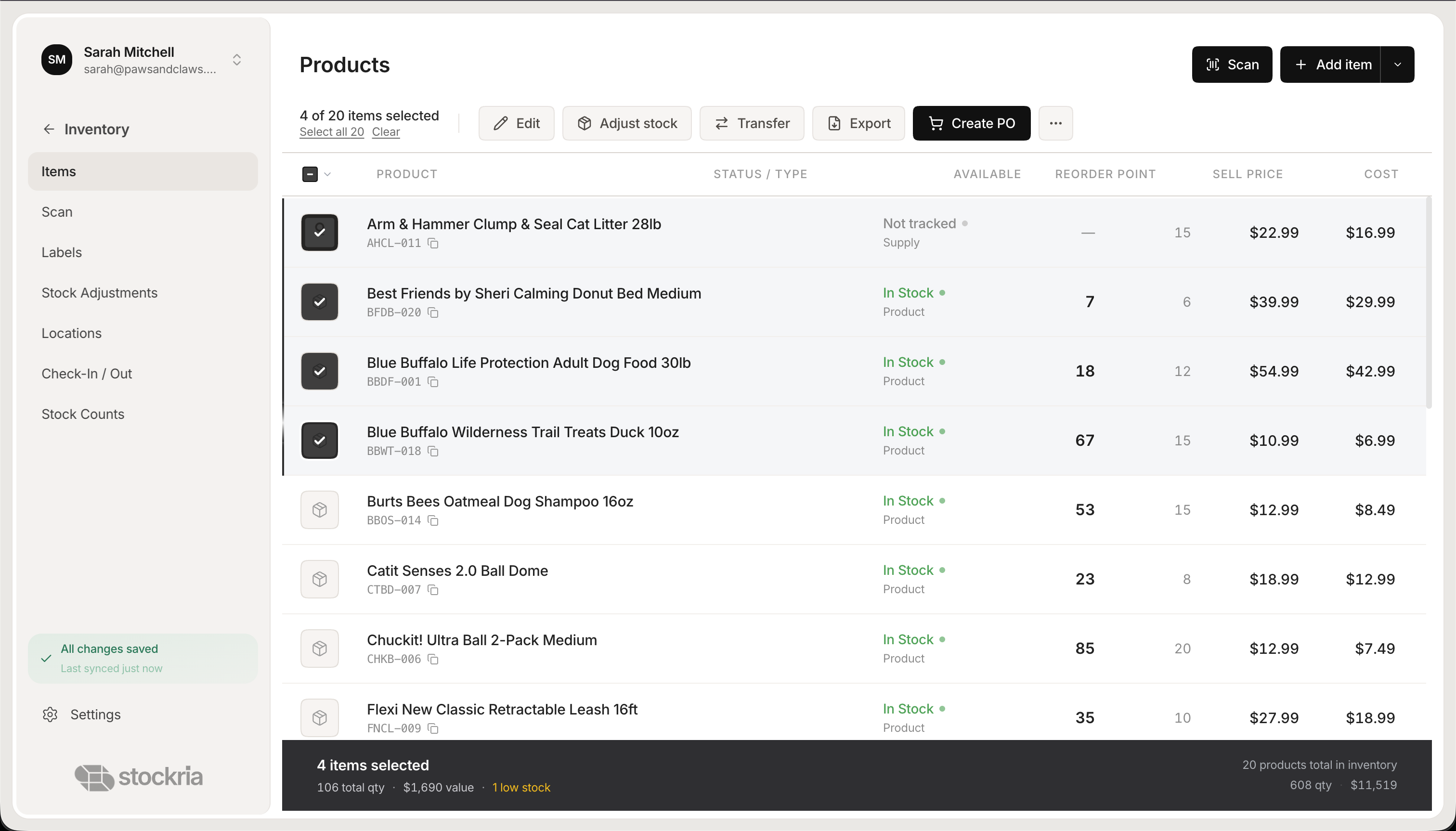 Stockria in action - Track every ingredient, supply, and packaging item with counts, costs, and reorder points.
Low-stock alerts before the dinner rush
The worst time to discover you're out of something is during service. Stockria sends alerts when items hit their reorder point. Check your alerts in the morning, before the prep cook arrives, and you know exactly what needs attention today.
Set different thresholds for different items. High-turnover ingredients like proteins and produce might need daily attention. Shelf-stable items like oil and flour can have wider buffers.
Vendor orders in minutes, not phone calls
Most restaurant ordering happens by phone, text, or scribbled notes. It works until it doesn't - until someone forgets an item, orders the wrong quantity, or can't read their own handwriting.
Stockria generates purchase orders from your low-stock list. Review the quantities, pick your vendor, and send as PDF or email. When the delivery arrives, scan what came in. If your vendor shorted you 2 cases, you'll know before the truck leaves.
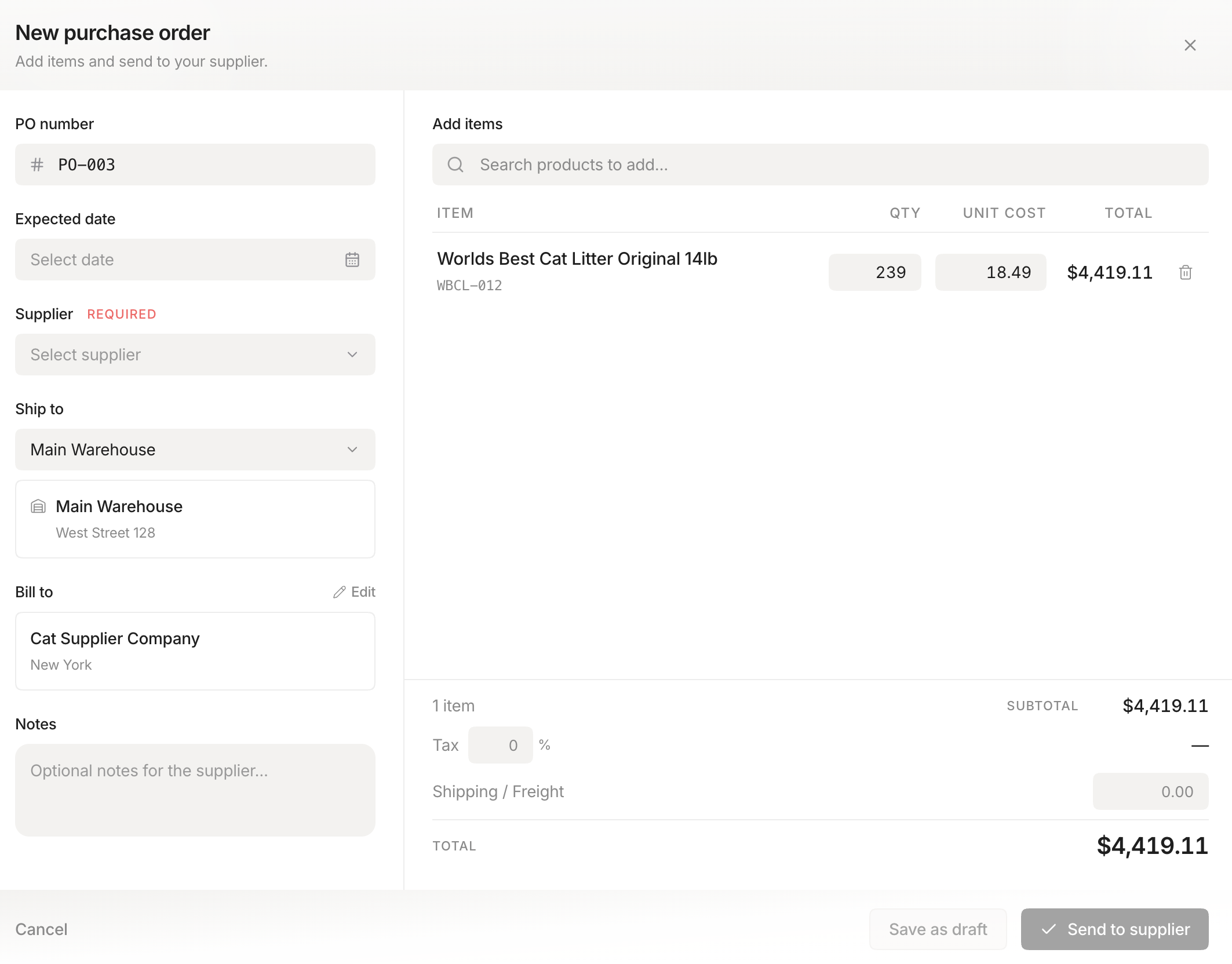 Stockria in action - Generate vendor orders from your low-stock list. Send as PDF or email directly from the app.
Multi-location for restaurant groups
If you run more than one location, you know the pain of not knowing what each kitchen has. Location A might be sitting on a surplus of something Location B desperately needs. Stockria shows you inventory at every location from one screen.
Transfer items between locations and keep the count accurate on both sides. Every transfer is logged - useful when you're trying to figure out why the numbers don't match at the end of the month.
See where your money goes
What percentage of your revenue is going to food costs? Which ingredients are you throwing away the most? Which vendor gives you the best price on your top items? Stockria's reports answer these questions without a spreadsheet.
Track inventory value by category - proteins, produce, dry goods, beverages, supplies. See movement over time. Spot the items that are costing you more than they should.
A typical week with Stockria
Monday: The kitchen manager checks the dashboard before the prep cook arrives. Four items are flagged: chicken breast, to-go containers, olive oil, and the house hot sauce. POs go to two vendors.
Tuesday: The produce delivery arrives. The kitchen scans each item in. 3 cases of romaine, 2 cases of tomatoes, confirmed against the PO.
Wednesday: Mid-week check. Chicken usage is higher than usual - a new menu item is selling well. Days until stockout: 2. An additional order goes out.
Thursday: The bar manager transfers 3 cases of tonic water from the storage room to the bar. Both counts update.
Friday: Before the weekend, the owner reviews the weekly report. Food cost is 31%. Produce waste is down from last month. The new menu item needs a higher par level.
Dealing with waste and spoilage
When food goes bad, log it as an adjustment with a reason - "expired," "spoiled," "overproduction." Stockria tracks waste over time so you can see patterns. If you're throwing away the same ingredient every week, you're ordering too much of it.
Works in the kitchen
Kitchen environments are tough on technology. Greasy hands, humid air, no desk. Stockria runs on your phone - the device already in your pocket. And it works offline, which matters when your walk-in cooler doesn't have WiFi.
Stockria vs other restaurant inventory tools
Pricing for restaurants
Free for up to 250 items, enough for a small menu's worth of ingredients. Pro is $19/mo with unlimited items. Business is $39/mo for up to 5 locations, and Growth is $89/mo for unlimited, ideal for restaurant groups.
Built for restaurants
Ingredient tracking, vendor orders, waste logging, and multi-location support. Free for 250 items. Pro starts at $19/mo.